What Card Materials Can a Self-Service Card Kiosk Print On
What Card Materials Can a Self-Service Card Kiosk Print On? For procurement and engineering teams, the answer is not a single substrate. It is a short list of materials that depends on the printer engine, the encoding modules, and the deployment environment. A self-service kiosk from NP Printer Kiosk Manufacturer, for example, is specified inside the Card Self-Service Kiosk category according to workflow and card lifecycle, not just print resolution. This guide explains the common card stocks, how each printing technology behaves, and which questions to ask before locking a material specification.
NP Printer Kiosk Manufacturer brings 20+ years in business and 300+ completed projects to kiosk configuration. But the material question remains yours to answer with real operating data. A card that prints beautifully on a desktop badge printer can jam, warp, or delaminate inside a public kiosk. The material selection therefore needs to happen alongside kiosk architecture decisions.
Why the Card Material Decision Must Precede Kiosk Configuration
Buyers often start with cabinet design, screen size, or payment modules. That sequence can create expensive rework. The card stock affects the feeder mechanism, the print head type, the lamination unit, and whether the kiosk can encode a chip or magnetic stripe in the same pass.
A kiosk built for event badges may use a lighter paper-composite card. A kiosk issuing healthcare or insurance cards may need a thicker polycarbonate blank that survives repeated handling. If the material is specified after the kiosk is assembled, the manufacturer may need to change the card hopper, adjust the fuser or transfer roller, or revalidate the encoding station.
That is why NP Printer Kiosk Manufacturer structures its product categories around application scenarios. The Event Badge & Card Kiosk line is configured for high-throughput, short-life cards at trade shows and check-in points. The Personal ID Card Kiosk line is configured for more durable credentials. Different materials sit behind those different use cases.
Card Materials a Self-Service Kiosk Can Typically Print On
Most self-service card kiosks handle four substrate families: PVC, PET or PETG, polycarbonate, and paper-synthetic composites. The exact compatibility depends on the print technology installed in the kiosk.
PVC
PVC remains the default card material for event badges, gift cards, and basic ID cards. Standard PVC cards follow ISO/IEC 7810 ID-1 dimensions: 85.60 mm × 53.98 mm. The common thickness is 0.76 mm, or about 30 mil. PVC is inexpensive, widely available, and works well with direct-to-card dye-sublimation printers. The surface accepts dye-sublimation inks readily, but it scratches without an overlay or laminate.
In a self-service kiosk, PVC cards feed reliably when the hopper is kept clean and the environment stays within reasonable temperature and humidity ranges. Heat is the main weakness. A kiosk placed in direct sunlight or near building exhaust can soften PVC cards enough to cause jams.
PET and PETG
PET and PETG offer better heat stability and chemical resistance than PVC. They are common in healthcare badges, long-term employee IDs, and cards that will be cleaned with alcohol or disinfectant wipes. PETG is often selected when the card must resist warping in a warm enclosure.
PET-based cards usually require retransfer printing. Direct dye-sublimation does not bond to PET as aggressively as it does to PVC. In retransfer printing, the kiosk prints the image onto a clear film and then heat-bonds that film to the card. That process opens the kiosk to more substrate types, including PET and polycarbonate.
Polycarbonate
Polycarbonate is the high-durability option. It is used in government IDs, driver’s licenses, and high-security credentials. Polycarbonate withstands higher temperatures than PVC and resists cracking when flexed. It is also suitable for embedded contact and contactless chips because the material can be laminated around the antenna and chip without easy delamination.
Polycarbonate cards are usually printed with retransfer or UV inkjet systems, not direct-to-card dye-sublimation. Some polycarbonate cards also receive laser engraving for monochrome personalization. The material cost is higher than PVC, and the lamination cycle is typically longer, which can slow the kiosk throughput if the sequence is not optimized.
Teslin and Paper-Synthetic Composites
Teslin is a microporous silica-filled polyolefin sheet. It is often laminated between polyester or PVC layers to make a printable card blank that accepts inkjet, thermal transfer, and some laser printing. Paper-synthetic composites are common for temporary event badges, wristband inserts, and low-cost visitor cards.
These materials are cheaper and easier to print with thermal transfer. However, they are more porous and less rigid than solid PVC or polycarbonate. A self-service kiosk using paper-composite cards needs a feeder that tolerates a little flex and a print engine that does not rely on high heat transfer through a solid plastic core.
Material Comparison Table
| Card Material | Typical Use | Common Print Technology | Key Handling Note |
|---|---|---|---|
| PVC | Event badges, basic ID, gift cards | Direct-to-card dye-sublimation, retransfer | Standard 0.76 mm thickness; needs overlay for durability |
| PET/PETG | Healthcare badges, long-term employee IDs | Retransfer, UV inkjet | Better heat and chemical resistance than PVC |
| Polycarbonate | High-security IDs, government credentials | Retransfer, UV inkjet, laser engraving | Higher cost; strong chip embedding and flex resistance |
| Teslin/paper composite | Temporary badges, visitor cards, wristband inserts | Thermal transfer, retransfer | Lower rigidity; more sensitive to feeder tension |
How the Print Engine Changes the Material Answer
A self-service card kiosk is not a generic printer. The print engine determines what the kiosk can physically image onto.
Direct-to-card dye-sublimation transfers dye from a ribbon directly to the card surface. It works best on PVC because the card surface must accept the sublimated dye. The process is fast, which suits event badge and visitor management workflows.
Retransfer printing adds a film step. The kiosk prints onto a transparent retransfer film and then bonds that film to the card. This separates the print surface from the card material. As a result, retransfer kiosks can handle PVC, PET, polycarbonate, and many composite cards. Retransfer is the usual choice when the card has an uneven surface, an embedded chip, or a material that resists direct dye bonding.
Thermal transfer uses a ribbon that melts onto the card surface. It is common for simple monochrome information, barcodes, and temporary badges. Thermal transfer works on paper, Teslin, and some synthetic stocks. It is less common for full-color photo IDs on solid PVC because the image durability and color gamut are limited.
UV inkjet prints directly onto rigid and flexible substrates with UV-curable inks. In kiosk form, UV printing is more common for custom objects, phone cases, and specialty cards than for high-volume ID issuance. UV inkjet can handle polycarbonate and PVC blanks, but the ink adhesion must be verified on each substrate. Surface treatment or adhesion promoters are sometimes required, especially on low-surface-energy plastics.
What Changes When Encoding and Lamination Happen Inside the Kiosk
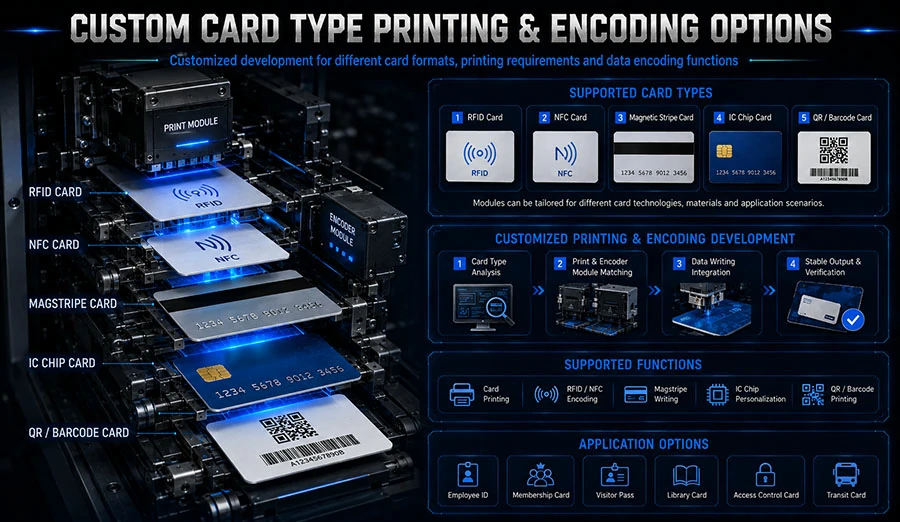
Many self-service card kiosks do more than print. They encode magnetic stripes, contact chips, or contactless modules in the same transaction. The card material must support that full sequence.
Magnetic stripe encoding follows ISO/IEC 7811, which defines track locations and encoding characteristics. The stripe is applied to the card during blank production, not by the kiosk. The card material must be flat and stiff enough for the stripe to pass under the read/write head without lifting.
Contact smart cards follow ISO/IEC 7816. The chip module is embedded in the card blank. Polycarbonate and PVC are common choices. The material must withstand the heat and pressure of chip embedding without deforming the card.
Contactless cards follow ISO/IEC 14443. The antenna and chip are embedded inside the card layers. Polycarbonate and PET-based composites are often used because they laminate cleanly around the antenna. If a kiosk must print and encode a contactless card in one pass, the retransfer print engine is usually preferred, because the card surface may have slight unevenness around the antenna.
Lamination also affects material choice. A clear laminate overlay protects the printed image and extends card life. PVC laminates bond well to PVC cards. Polycarbonate cards require a laminate film and temperature profile matched to the core material. If the laminate is specified for PVC but applied to polycarbonate, the overlay can peel or the card can curl.
Common Material Mistakes That Delay Kiosk Projects
Buyers sometimes choose the cheapest blank and then discover the kiosk cannot feed it reliably. Paper-composite cards are economical, but they flex more than PVC. A feeder tuned for a rigid 0.76 mm PVC card may double-feed a thinner or softer composite. Consistent card thickness is critical. A typical PVC blank varies by only a small manufacturing tolerance, but lower-cost composite cards can have wider thickness variation.
Another mistake is ignoring heat stress. A kiosk installed near a window or in a non-climate-controlled lobby can reach internal temperatures well above ambient. PVC softens earlier than polycarbonate. If the deployment environment is hot, specifying PETG or polycarbonate from the start avoids field failures.
Surface energy is another hidden variable. UV inkjet and some thermal transfer ribbons need a minimum surface energy to bond. PVC and polycarbonate generally accept print well after proper cleaning or corona treatment. Some recycled or matte cards have lower surface energy, which can cause poor adhesion. Always request a print adhesion test on the exact blank you plan to use.
One more point: material choice affects card durability claims. If the application requires a card to survive two years in a wallet, PVC with a laminate may be adequate. If the card will be cleaned with alcohol wipes 200 times in a healthcare setting, PETG or polycarbonate is likely a better fit. No kiosk can fix a material that is not suited to the daily use.
Questions to Ask a Kiosk Manufacturer Before Freezing the Card Spec
A practical specification conversation should cover the print engine, the card blank, the feeder, the encoder, and the laminate as one integrated system. These questions help.
Can the kiosk print on the exact card blank we already purchase?
Do not assume compatibility. Send the manufacturer a sample reel or box of the exact blank, including its technical data sheet, thickness tolerance, and surface treatment. The manufacturer can validate feeding, printing, and encoding on that specific material.
Does the kiosk support retransfer printing?
Retransfer is the most flexible option for mixed-material environments. If you plan to use PET, polycarbonate, or composite cards now or later, a retransfer engine gives you more material latitude than direct-to-card dye-sublimation.
What is the total cycle time for print, encode, and laminate?
Material choice can change cycle time. Polycarbonate lamination cycles are often longer than PVC overlay cycles. If the kiosk must issue a card in under 30 seconds, the material and the print engine must be specified together.
How does the kiosk handle card warping or heat in our environment?
Ask for the recommended operating temperature and humidity range. If the deployment site is hot or humid, choose a more heat-stable material and confirm the kiosk’s internal fan or thermal management can keep the card feeder within that range.
A Practical Path from Material Data Sheet to First Card Run
Start with the end-use requirement, not the printer model. Define how long the card must last, what cleaning chemicals it will encounter, whether it needs a chip or magnetic stripe, and how many cards the kiosk will issue per day. Then shortlist materials that meet those physical requirements.
Next, ask the kiosk manufacturer to test the chosen blank in the actual kiosk configuration. NP Printer Kiosk Manufacturer operates with 8+ branch offices and 480+ trained staff, which supports application-specific validation across different regions. A test run on a sample blank is far cheaper than changing the card stock after 50 kiosks are already in the field.
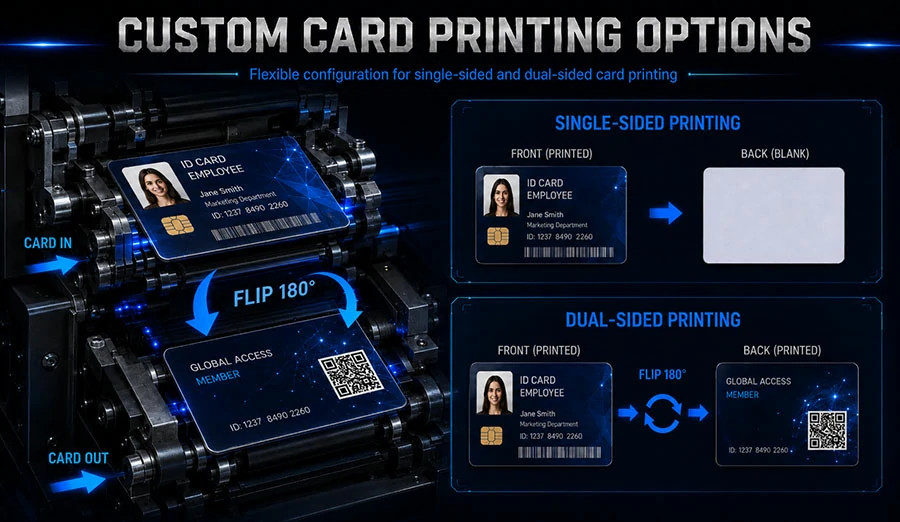
The full range of integrated kiosk hardware is available on the NP Printer Kiosk Manufacturer shop, and the company’s engineering team can be engaged for material-specific validation. If your project involves insurance or healthcare issuance, ask whether a dual-sided printing and encoding configuration is needed. If your project involves trade shows, the event badge workflow will likely prioritize speed and lower-cost card stock over extreme durability.
Frequently Asked Questions
Can a self-service kiosk switch between PVC and polycarbonate without changing hardware?
It depends on the print engine. A retransfer kiosk can often handle both PVC and polycarbonate because the image is bonded to the card through a film. A direct-to-card dye-sublimation kiosk is usually limited to PVC and similar printable plastics.
What card thickness should a kiosk use for chip encoding?
ISO/IEC 7810 ID-1 cards are typically 0.76 mm thick. Contact and contactless chip cards usually stay near that thickness to pass through encoder contacts and card readers reliably. Always confirm the blank supplier’s thickness tolerance with the kiosk manufacturer.
Do kiosks print on paper-based or Teslin cards?
Yes, many kiosks using thermal transfer or retransfer can handle Teslin and paper-synthetic composites. These materials are common for temporary badges and visitor cards. The feeder must be adjusted for lower rigidity and wider thickness variation.
How does material choice affect the printed card’s lifespan?
Material choice has a direct impact. PVC with a laminate can last for several years in normal wallet use. PETG and polycarbonate offer better heat and chemical resistance in healthcare or outdoor conditions. No print technology can overcome a substrate that is too soft or brittle for the application.
Does lamination change which card materials a kiosk can use?
Lamination adds another material compatibility layer. PVC overlays bond best to PVC cards. Polycarbonate cards need a laminate film matched to the core material. If the laminate and card stock are mismatched, the card can curl or the overlay can peel.
From material data sheet to first card run, the rule is the same: define the card’s working life and environment first, then select the print engine and kiosk configuration around it. That sequence prevents the most common field failures in self-service card issuance projects.