How to Reduce Misfeeds in Automatic Card Kiosks
A card kiosk that jams is not a printing problem — it is a queue problem, a support-ticket problem, and eventually a contract-renewal problem. When a self-service card kiosk stops mid-issue, the user standing in front of it does not care that the feed roller was 0.3 mm out of tolerance. They walk away, and the operator absorbs the cost of a failed transaction plus the labor to clear it.
Misfeeds in automatic card kiosks rarely come from a single defect. They come from the interaction between card stock, feed mechanism geometry, environmental humidity, and the firmware logic that decides when to pull the next card. Fix one and the jam rate drops. Fix all four and it stays low. This guide walks through the diagnostic and design decisions that actually move the number — written for the engineers, integrators, and procurement teams specifying card self-service hardware, not for someone looking for a quick cleaning tip.
If you are sourcing a new unit or retrofitting an existing fleet, the same logic applies. The goal is a feed path you can predict, measure, and service without pulling the machine out of the lobby.
Key Takeaways
- Most card jams trace to feed-roller pressure drift, card warpage, or static — not to the print engine itself.
- Card thickness and surface finish must be specified against the feeder’s rated range, not assumed.
- Humidity control inside the enclosure is cheaper than field service calls for repeated misfeeds.
- Firmware retry logic and sensor placement decide whether a near-miss becomes a jam or a clean pass.
- A documented incoming-inspection routine (thickness, warp, cleanliness) prevents most batch-related failures.
Start With the Card, Not the Machine
The single most common mistake in misfeed troubleshooting is opening the printer before opening the card box. Card stock is the variable that changes most often and is controlled least rigorously. A card that measures within nominal thickness can still warp, carry surface contamination, or vary in stiffness enough to defeat a friction feeder.
Three properties matter for reliable feeding:
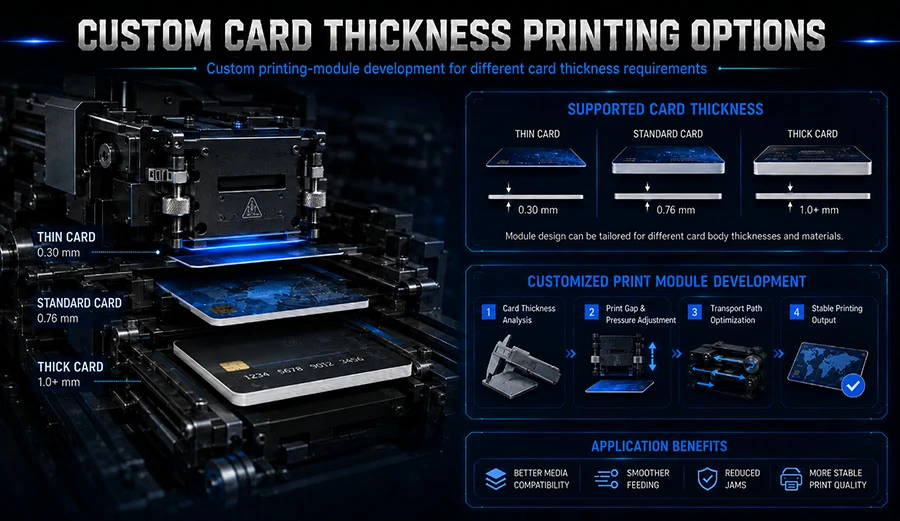
Caliper (thickness) and its tolerance. Most card kiosk feeders are rated for a specific thickness band — commonly around the 0.76 mm (30 mil) range typical of ISO/IEC 7810 ID-1 cards, with PVC and composite cards often running 0.68–0.84 mm depending on construction. What breaks feeders is not the nominal value but the spread within a batch. A reel or box where thickness swings by more than roughly ±5% across the stack will feed unevenly, because the separation gap set for the thin end will drag on the thick end. Ask your card supplier for the caliper tolerance on the actual production lot, not the catalog spec.
Warp and flatness. Cards absorb moisture unevenly. A card with a visible bow — even 1–2 mm across the diagonal — presents a leading edge at an angle to the feed rollers and rides up instead of entering the nip. This is why misfeeds cluster in humid months and in kiosks placed near entrances or HVAC vents.
Surface energy and static. Low-surface-energy cards (some coated or laminated stocks) slip; statically charged cards stick together and double-feed. Both look like “the machine is broken” to the user.
The practical fix is an incoming inspection routine you can run in minutes: sample caliper with a micrometer at three points per card across a batch, check flatness on a granite flat or glass surface, and log the storage humidity where cards are kept before loading. If you cannot get a certificate of analysis (COA) or technical data sheet (TDS) from your card supplier stating caliper tolerance and recommended storage conditions, treat that as a sourcing risk, not a paperwork gap.
Match the Feed Mechanism to the Duty Cycle
Not all card feeders are built for the same throughput. A friction feeder with a single pick roller is fine for low-volume event badge issuance. It is the wrong choice for a high-traffic insurance or ID card kiosk running hundreds of cards a day, because roller wear accumulates faster than the maintenance interval assumes.
When you specify or evaluate a card kiosk — for example the units in the card self-service kiosk range — ask three questions about the feed path:
- What is the rated card thickness range, and what is the tested tolerance within that range? A range without a tolerance is marketing, not a spec.
- How is separation gap adjusted, and is it tool-free? Field-adjustable separation saves service time; a fixed gap forces you to change card stock instead.
- What is the roller material and its rated life in card cycles? Rubber compounds differ in compression set; a roller that flattens under continuous pressure loses pick force before it visibly wears.
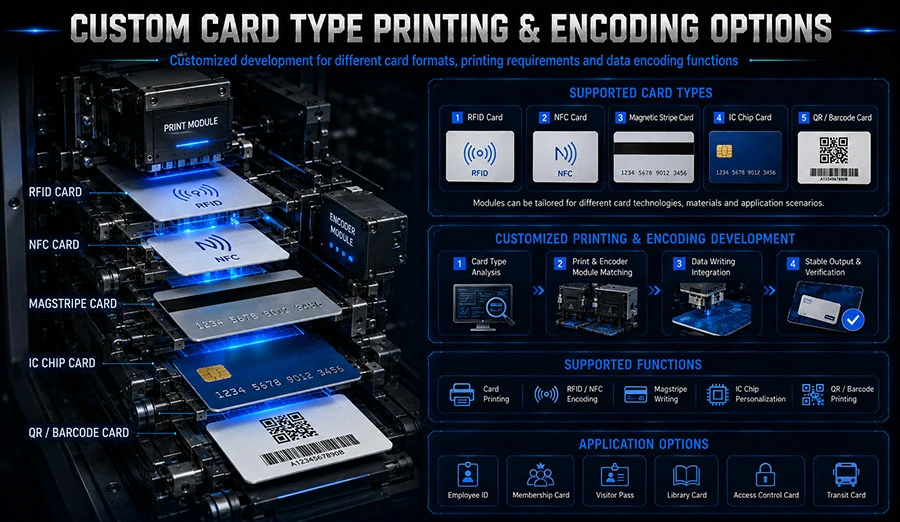
For applications where cards are printed, encoded, and issued in one pass — event badges, personal ID, insurance cards — the feed mechanism also has to survive the encoding and inspection stages without re-presenting a card at a bad angle. A kiosk that handles event badge and card issuance typically runs a flatter, more direct card path than one that flips cards for dual-sided work, and that geometry difference shows up directly in jam rates.
The honest answer on roller life is that it depends on card surface finish and duty cycle. Manufacturers who quote a single number without stating the test conditions are guessing. Ask for the internal test method: card type, cycles per day, and the failure criterion used (pick failure rate, not “roller worn”).
Control the Environment Inside the Enclosure
A kiosk is a small climate. The print engine generates heat, the enclosure traps it, and the card stack sits in whatever humidity the room provides. That combination drives two failure modes: condensation on cold cards moved into a warm enclosure, and static buildup in dry conditions.
You do not need a laboratory. You need three controls:
- Relative humidity in the card storage and loading area. Most card handling guidance points to a moderate range — roughly 40–60% RH is a common industry target for PVC card storage, though your card supplier’s TDS should govern. Below that, static and curl increase; above it, cards absorb moisture and warp.
- Thermal equilibration before loading. Cards stored in a cold warehouse and loaded straight into a warm kiosk will attract condensation. Let sealed boxes equilibrate to room temperature before opening — typically several hours for a full box, longer in winter.
- Static dissipation at the feed inlet. Anti-static brushes, ionizing bars, or conductive feed-path components are inexpensive relative to a service call. If your jam log shows double-feeds concentrated in dry months, this is the first thing to add.
Grounding is part of this. A kiosk chassis that is not properly bonded to earth will hold a charge and hold onto cards. Verify continuity from the feed module to the enclosure ground point as part of commissioning, not as an afterthought.
Tune the Firmware and Sensor Logic
Hardware sets the ceiling on reliability; firmware decides how often you hit it. Two logic choices matter more than most operators realize.
Sensor placement and debounce. A card-present sensor positioned too close to the nip will trigger on a card that is still being pulled, causing the transport to advance before the card is seated. Position sensors to confirm full seating, and add a debounce window so a momentary signal flicker does not abort the cycle. The difference between a 50 ms and a 150 ms debounce window can be the difference between a clean pass and a false jam on a slightly warped card.
Retry logic that does not make things worse. A naive retry pulls the card again at the same pressure and angle, which usually jams it harder. Better logic reverses the feed slightly, re-seats the card, and retries once before flagging a fault. Cap retries at one or two — beyond that you are grinding the card and the roller.
Jam logging with enough detail to diagnose. Log the card position, sensor states, elapsed time, and ambient temperature at the moment of failure. A jam log that only says “error 04” tells you nothing. A log that shows every failure occurred at 18°C and 30% RH tells you to fix the environment, not the printer.
If your kiosk includes an inspection stage — as some issuance kiosks do with AI-based card inspection — use that same camera or sensor data to flag warped or contaminated cards before they reach the feeder. Rejecting a bad card at the input is cheaper than clearing it from the transport.
Build a Maintenance and Inspection Routine That Actually Gets Done
The best feed design fails if nobody services it. The trap is a maintenance schedule written for a lab and applied to a lobby. Make the routine short enough that a site attendant will actually perform it.
A workable cadence for a mid-volume card kiosk:
- Daily (attendant, under two minutes): visual check of the card stack for warped or damaged cards, confirm the stack is loaded square and below the max fill line, clear any visible dust at the inlet.
- Weekly: clean feed rollers with the roller manufacturer’s recommended cleaner — not alcohol unless specified, since some rubber compounds degrade — and check separation gap against the gauge.
- Monthly: verify humidity in the storage area, inspect anti-static components, review the jam log for patterns by time, temperature, and card batch.
- Per roller-life interval: replace pick and separation rollers as a set, not individually. Mixing a new pick roller with a worn separation roller changes the gap geometry and causes double-feeds.
Track mean cards between jams (MCBJ) as your primary metric, not jam count. Jam count rises with volume and tells you nothing; MCBJ normalizes for throughput and shows whether a fix worked. If you run a mixed fleet across sites, compare MCBJ by site — the outlier site is your environmental or handling problem.
For operators specifying new equipment, ask the manufacturer what their incoming-inspection and roller-replacement guidance is, and whether they provide a maintenance schedule tied to duty cycle. A supplier who can answer that in writing has usually thought about field reliability. You can see how a custom build is scoped on the about page and in the broader product catalog.
Pro Tips for Success
- Specify card stock with a written caliper tolerance and storage condition, and hold suppliers to it. A COA per lot is normal for industrial card stock; if it is not offered, ask why.
- Set the separation gap with a feeler gauge at commissioning and record the value. When jams start, you will know whether the gap drifted or the cards changed.
- Replace rollers as a set and log the cycle count. Individual replacement is the most common cause of a jam rate that climbs after a “successful” repair.
- Put a cheap temperature/humidity logger inside one kiosk per site. Correlating jam logs with environment data turns guesswork into a fix you can justify to finance.
- Reject warped cards at the input, not the transport. A flatness check at loading costs seconds; a mid-transport jam costs a queue.
Frequently Asked Questions
Why does my card kiosk jam more in summer?
Humidity drives card warp and static. In humid months cards absorb moisture unevenly and bow; in dry, air-conditioned spaces static causes double-feeds. Check storage humidity and thermal equilibration before blaming the printer, and log ambient conditions at each failure to confirm the pattern.
Can I use third-party card stock in a branded kiosk?
Usually yes, provided the stock falls within the feeder’s rated thickness range and tolerance. The risk is batch variability, not brand. Request a caliper tolerance and storage recommendation from the card supplier, and run a sample batch through the kiosk before committing to volume.
How often should feed rollers be replaced?
It depends on duty cycle, card surface finish, and roller compound — there is no universal number. Track mean cards between jams and replace pick and separation rollers as a set when the rate degrades. Ask the manufacturer for their internal test conditions rather than accepting a single cycle figure.
What is a normal jam rate for a card kiosk?
There is no industry-wide published figure that applies to every design and duty cycle. What matters is your own baseline: measure mean cards between jams at commissioning, then watch for drift. A rate that climbs after a card batch change points to stock; one that climbs with season points to environment.
Where This Leaves You
Reducing misfeeds in automatic card kiosks is a systems job, not a cleaning job. The card sets the input conditions, the feed mechanism sets the mechanical ceiling, the enclosure sets the environment, and the firmware decides how gracefully the machine handles the edge cases. Fix the card inspection routine first because it is cheapest, then the environment, then the roller maintenance cadence, and only then revisit hardware. In most fleets, the first three steps recover the majority of lost transactions.
Start this week with two actions: pull your jam log and sort failures by date, site, and ambient condition; then measure caliper and flatness on the current card batch. Those two data sets will tell you whether your next investment is a humidity logger, a roller kit, or a conversation with your card supplier. If the data points to a feed path that cannot meet your duty cycle, that is the moment to look at a purpose-built card kiosk rather than keep servicing a machine that was specified for lighter use.