How Card Thickness Affects Kiosk Feeding Reliability
Card thickness is one of the most underestimated variables in self-service card issuance. A kiosk that jams once a week in a busy insurance office or event venue costs far more than the card stock it wastes — it costs queue time, staff intervention, and user trust. Most feeding failures traced back to card stock are not random; they follow predictable patterns tied to caliper, stiffness, and how those properties interact with roller pressure, separation gaps, and transport path geometry. This guide walks through how card thickness affects kiosk feeding reliability, from the moment a card leaves the hopper to the point it enters the print or encoding station, and shows procurement and engineering teams how to specify, test, and qualify card stock so a kiosk keeps issuing without babysitting. It is written for B2B buyers, integrators, and operations managers who specify card self-service equipment and need feeding behavior to hold up across shifts, sites, and card suppliers.
Key Takeaways
- Card caliper (thickness) changes stiffness, friction, and separation behavior — all three drive feed reliability.
- Most card kiosks are engineered around a nominal card thickness band; stock outside that band raises jam and double-feed risk.
- Roller pressure and separation gap must be matched to the card stock, not set once and forgotten.
- Environmental conditions (humidity, temperature) shift card friction and should be part of any feed qualification test.
- A documented incoming-inspection routine on card stock prevents most thickness-related feeding failures.
Why Card Thickness Is a Feeding Variable, Not a Footnote
A card is not a rigid sheet. It bends as it is picked, dragged through a separation gap, and pushed around transport rollers. How much it bends depends on its thickness and its material stiffness (flexural modulus). A card that is too thin can flex enough to slip under a separation roller and double-feed; a card that is too thick can bind in a transport channel or fail to seat fully in a print or encoding station. The card kiosk category — event badges, personal ID cards, insurance cards — each carries its own card stock conventions, and the feeding mechanism has to be matched to them.
Traditional “set it and forget it” approaches assume card stock is uniform. In practice, card stock varies by supplier, by production lot, and by storage conditions. A kiosk qualified on one batch of cards can behave differently on the next. That is why thickness belongs in the specification and incoming-inspection process, not just in the mechanical design.
The Physics Buyers Should Understand
Three properties interact whenever a card is fed:
- Caliper (thickness) — measured in mils or millimeters. It sets how much the card resists bending and how much clearance it needs in the transport path.
- Stiffness — a function of thickness and material modulus. Stiffer cards separate more cleanly but are less tolerant of tight radii and misalignment.
- Surface friction — the coefficient between card and roller. Too low and the pick roller slips; too high and cards drag each other forward, causing double-feeds.
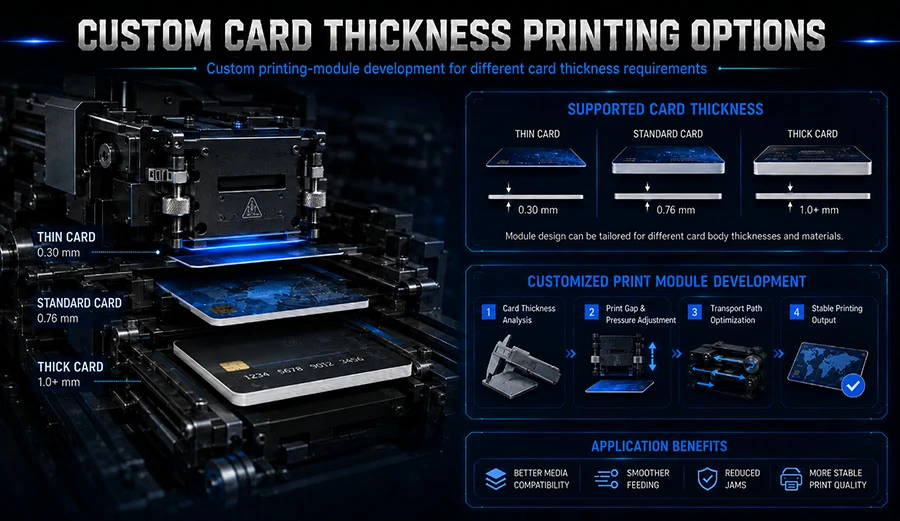
Industry standards for ID-1 cards (the CR80 format used for most badges and cards) define a nominal thickness of about 0.76 mm (30 mil), with tolerances that vary by standard and card construction. PVC, PET, and composite cards of the same nominal caliper can behave differently because their stiffness and surface finish differ. That is why a thickness number alone is not enough — it must be paired with material and finish data from the card supplier’s technical data sheet (TDS).
Step 1 — Define the Card Stock Envelope Before You Specify the Kiosk
What to Do
- Collect the technical data sheet (TDS) for every card stock you expect to run — nominal caliper, tolerance, material, surface finish, and any overlay or laminate.
- Note the full thickness range, not just the nominal value. A 30 mil card with a ±10% tolerance spans a meaningful band.
- Identify whether cards will be pre-printed, blank, or encoded, and whether any overlay or coating changes surface friction.
- Confirm the card format (ID-1/CR80 or other) and whether the kiosk will handle mixed stock.
Why This Matters
The kiosk’s feed mechanism is designed around a card envelope. If your stock sits at the edge of that envelope, every other variable — humidity, roller wear, card curl — pushes it toward failure. Defining the envelope first lets you match the kiosk specification to reality instead of discovering the mismatch after deployment.
Common Mistakes to Avoid
- Specifying only nominal thickness: The tolerance band is what the feeder actually sees. Ask for the full range.
- Ignoring material differences: A PET card and a PVC card at the same caliper can feed differently. Match material to the application and confirm with the kiosk supplier.
Step 2 — Match Roller Pressure and Separation Gap to the Card
What to Do
- Ask the kiosk supplier for the specified card thickness range and the recommended roller pressure and separation gap settings.
- Run a feed test with the thinnest and thickest cards in your envelope, not just the nominal stock.
- Record double-feed and misfeed counts across a meaningful sample — several hundred cards per condition is a practical starting point for a qualification run.
- Adjust separation gap and roller pressure within the supplier’s recommended range and re-test.
Why This Matters
Separation gap and roller pressure are the two adjustments that most directly translate card thickness into feed behavior. A gap set for a thin card will bind a thick one; a pressure set for a stiff card will slip on a flexible one. Testing at the extremes of the envelope exposes problems before they reach a live site.
Common Mistakes to Avoid
- Testing only one card batch: Lot-to-lot variation is real. Test at least two production lots.
- Setting pressure by feel: Use the supplier’s specification and document the setting. Undocumented adjustments are impossible to replicate across sites.
Step 3 — Qualify Card Stock Under Real Environmental Conditions
What to Do
- Identify the temperature and humidity range the kiosk will actually see — an outdoor event venue and a climate-controlled insurance office are different environments.
- Condition card stock at the high and low ends of that range before testing.
- Re-run the feed test and record jam rates.
- If jam rates rise at the extremes, adjust storage and handling guidance for the site.
Why This Matters
Humidity changes both card stiffness and surface friction. Cards stored in a humid back room can feed differently from the same stock stored in a dry one. Qualifying under real conditions turns an unpredictable field failure into a known, manageable variable. Where exact performance data is not available, treat the result as a typical range and confirm with sample testing at the site.
Common Mistakes to Avoid
- Assuming lab conditions equal field conditions: Always test at the environmental extremes the site will experience.
- Skipping storage guidance: Simple rules — sealed stock, acclimatization before loading — prevent many humidity-driven jams.
Step 4 — Build an Incoming-Inspection Routine for Card Stock
What to Do
- Measure caliper on a sample from each incoming lot using a micrometer, and compare against the TDS tolerance.
- Check surface finish and flatness — curl and coating variation affect feeding as much as thickness.
- Log the results against the lot number and the kiosk’s feed performance.
- Reject or quarantine lots outside the specified envelope before they reach the hopper.
Why This Matters
Most thickness-related feeding failures are preventable at the loading dock. A simple caliper check and a flatness check catch the out-of-spec lots before they cause a queue. The log also builds a record that lets you trace a field jam back to a specific card lot — useful when negotiating with a card supplier.
Common Mistakes to Avoid
- Spot-checking a single card: Sample across the lot; variation within a lot is the failure mode you are looking for.
- No record-keeping: Without a log, you cannot tell whether a jam is a card problem or a kiosk problem.
Step 5 — Specify the Right Kiosk Platform for Your Card Mix
What to Do
- Match the kiosk platform to the card application — event badges, personal ID cards, and insurance cards each carry different stock and throughput expectations.
- Confirm the platform’s specified card thickness range covers your envelope with margin.
- Ask for feed-test data at the extremes of your envelope, not just the nominal card.
- Confirm service access to rollers and separation gap for routine adjustment.
Why This Matters
The kiosk platform sets the mechanical ceiling on feed reliability. A platform specified for a narrow card band will struggle with a wider one, no matter how carefully you test. Choosing the right platform — and confirming its specified range — is the single highest-leverage decision in the whole process.
Common Mistakes to Avoid
- Choosing on price alone: Feed reliability is a lifecycle cost. A cheaper platform that jams weekly costs more in staff time.
- Not asking for the specified range in writing: Get the card thickness range and adjustment procedure documented.
Pro Tips for Success
- Keep a card-stock log per site: Record lot number, caliper, and jam counts. Patterns emerge within a few weeks and point directly to the cause.
- Standardize on one card supplier where possible: Fewer suppliers means fewer variables and a tighter feed envelope.
- Train staff on the caliper check: A five-minute check at receiving prevents most thickness-related jams.
- Re-qualify after any card stock change: A new supplier or material is a new variable — test before deploying.
Frequently Asked Questions
What card thickness do most kiosks support?
Most card kiosks are engineered around the ID-1 (CR80) format at a nominal caliper near 0.76 mm (30 mil), with a specified tolerance band. The exact supported range varies by platform and should be confirmed in writing with the kiosk supplier before you specify card stock.
Can a kiosk handle both thin and thick cards in the same hopper?
Some platforms can, within their specified range, but mixed stock raises double-feed risk because separation gap and roller pressure are set for one envelope. If you must run mixed stock, test the extremes together and confirm the platform’s specified range covers both.
Why do cards jam more in humid conditions?
Humidity changes card stiffness and surface friction. Cards absorb moisture, become more flexible, and can slip or drag differently through the separation gap. Conditioning stock and testing at the site’s humidity extremes is the practical fix.
How do I know if a jam is caused by card thickness?
Measure the caliper of the jammed cards against the TDS tolerance. If they sit outside the specified envelope, thickness is the likely cause. If they are in spec, check roller wear, separation gap, and environmental conditions before blaming the card stock.
Where to Go From Here
Card thickness affects kiosk feeding reliability through stiffness, friction, and separation behavior — three properties that must be matched to the platform, the environment, and the card stock itself. The practical path is straightforward: define the card envelope from the TDS, match roller pressure and separation gap to it, qualify under real conditions, and build an incoming-inspection routine that catches out-of-spec lots before they reach the hopper. None of these steps requires exotic equipment — a micrometer, a feed-test log, and a documented adjustment procedure cover most of the risk. For teams specifying a new deployment, start by reviewing the platform’s specified card thickness range against your actual stock, then confirm feed performance at the extremes of your envelope. If you are evaluating card issuance platforms for event badges, personal ID cards, or insurance cards, the card self-service kiosk range and the insurance card kiosk platform are useful starting points, and the about page covers the manufacturer’s customization and deployment experience.